Absher username & password rules (Absher Login)
When creating your username, Absher requires Latin characters only, minimum of 8 characters, starting with a letter, with no special characters. Absher also notes that the username cannot be edited later. Absher
For your password, Absher’s policy states it must be at least 8 characters and must contain uppercase, lowercase, and numeric characters. Additional official rules include that it must not contain a portion of the User ID longer than half its length, should not repeat a character more than half the length of the password, and that the “confirm password” must match the new password. These policies are documented on Absher’s own pages for registration/reset/help
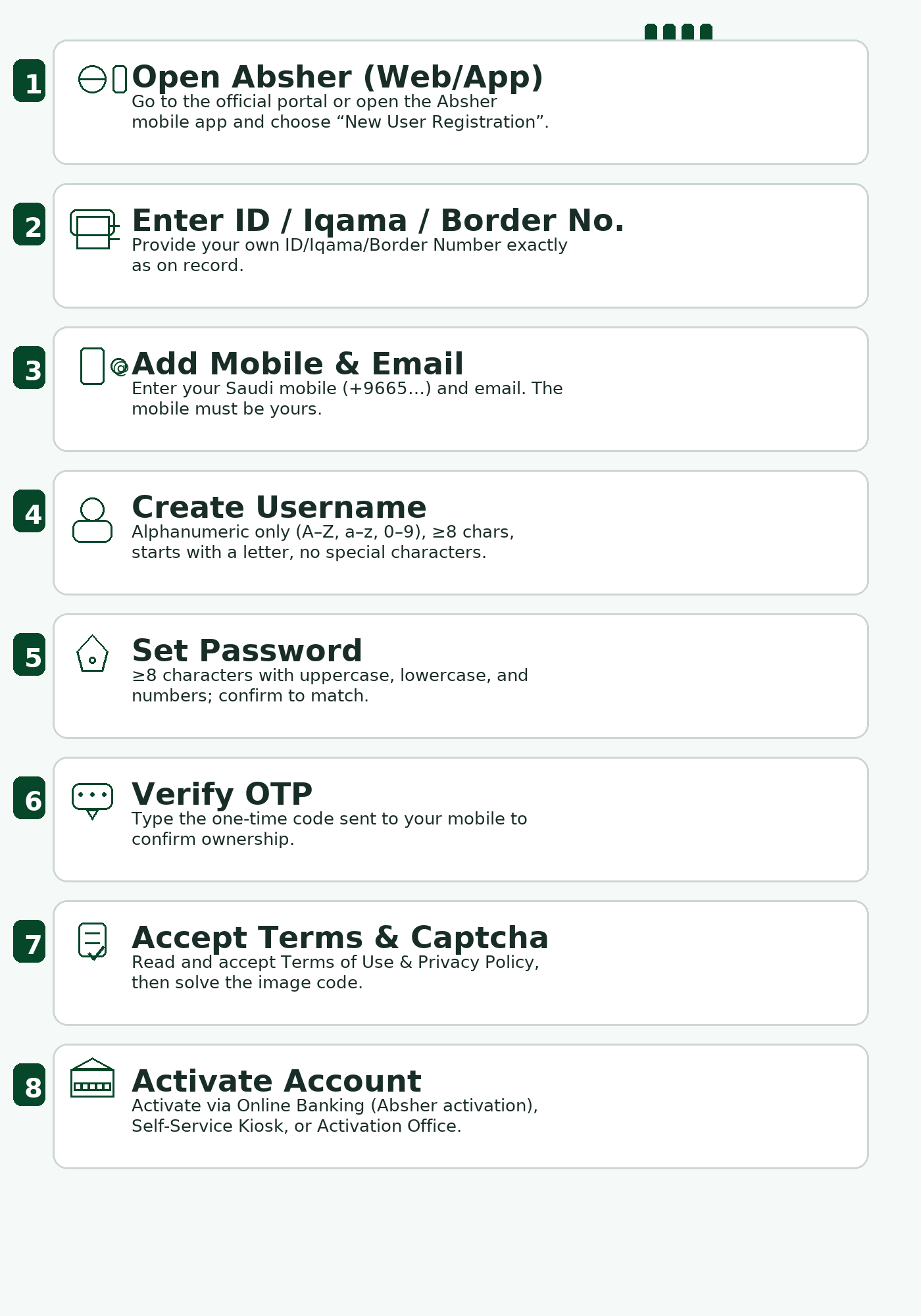
Step-by-step: How to register on the Absher web portal (How to register Absher Account) Iqama Border Number
Use the web portal if you prefer to type on a computer. The steps below mirror the fields you’ll see on the official “Register” page. Absher
Open the Absher portal and go to the public homepage, then follow the registration link (“New User Registration”). Absher
Fill “Personal Information”:
- ID/Iqama/Border Number (choose the one that applies).
- Mobile Number (beginning with +966 5xxxxxxxx).
- Email address.
Absher warns that entering an incorrect mobile number will cause registration failure and that using someone else’s ID is illegal. Absher
- Complete “Account Information”:
- Username (Latin letters, min 8, start with a letter; no special characters; cannot be changed later).
- Password and Password Confirmation (obey Absher password policy).
Preferred Language (Arabic or English). Absher
Enter the “Image Code” (captcha) exactly as shown. Absher
Accept the Terms of Use & Privacy Policy and submit. Absher
Verify your mobile number with the one-time password (OTP) sent to the number you entered. (This is part of the registration/activation flow to confirm your identity and contact details.) Absher
Proceed to activation (required). After registering, your account must be activated via one of the official channels described below (banks, self-service machines, or activation offices). Absher
Step-by-step: How to register using the Absher mobile app (how do i register my absher account)
If you prefer to register on your phone, install the official application and follow a similar flow. The app is published by Saudi authorities (Ministry of Interior/National Information Center) and supports both Arabic and English. Apple & Google Play
Install the official Absher app from the App Store (iOS) or Google Play (Android). Confirm the developer and app details on the store page before installing. Apple & Google Play
Open the app → “New User Registration.” Enter your ID/Iqama/Border Number, mobile number, email, choose a username, set a password that meets policy, pick your language, and complete the captcha. The same rules and notes apply as for the web portal. Absher
Verify via OTP Absher sent to your mobile number and complete activation using one of the official methods (below). Once activated, you can use the app to access services. Absher
Activation: three official ways to activate your Absher account
Registration alone isn’t enough; you need to activate your account to use e-services. Absher provides multiple activation channels—online through participating banks, self-service registration/activation machines, and activation offices (e.g., Jawazat/civil affairs locations). Absher
A) Absher Activation through banks (online or ATM, depending on your bank)
Absher publishes instructions for activation via banks (e.g., selecting “MOI e-services (Absher) activation” in online banking or at designated ATM/service menus, then confirming your data). Steps from participating banks follow this general flow: open your bank’s e-channels, find the Absher activation option, review data, agree/confirm, and finish. Your Absher account becomes active after you complete the bank’s steps. For specific menus, check the official Absher “Activation through Banks” pages. Absher
B) Activation via Self-Service Machines
Absher maintains a list/map of self-service kiosks that allow registration and activation. You can locate a nearby machine, follow the on-screen prompts, verify your identity (e.g., by ID/Iqama details and OTP) and complete activation. Use Absher’s official “Locations for Registration and Activation” page to find a machine close to you. Absher
C) Activation at Registration/Activation Offices
If you prefer in-person help, visit the official registration and activation offices listed by Absher. These include civil affairs/Jawazat points where staff can assist with activation after verifying your information. Use the same official locations page to find an office. Absher
The Absher registration form, field-by-field (Absher Registration Guidelines)
This section mirrors the on-screen text users see when registering a new Absher account and consolidates Absher’s notes and policies.
- Process stages on screen: New User Registration → User info → Confirmation → Registration completion. Absher
- Mobile number reuse notice: “If the new mobile number is registered with any other Absher account before, it will be removed from that account and will be registered with this account.” Absher
- Mandatory fields: Marked with “*”. Absher
Personal Information
- ID/Iqama/Border Number*: enter your own, not someone else’s (using someone else’s ID is illegal). Absher
- Mobile Number*: +966 5xxxxxxxx (ensure accuracy; incorrect entry causes registration failure). Absher
- Email*: example@example.com (provide a working email). Absher
Account Information
- Username*: must be at least 8 characters, start with a letter, contain only Latin characters (no special characters), and cannot be edited later. Absher
- Absher Password*: at least 8 characters, include uppercase + lowercase + numbers; Confirm Password must match. Absher also sets additional constraints (e.g., cannot include a portion of the User ID longer than half its length; no excessive character repetition). Absher
- Preferred Language*: Arabic or English. Absher
- Image Code (captcha)*: type the characters exactly. Absher
- Terms acceptance: you must read/accept the Terms of Use and Privacy Policy. Absher
Important on-screen notes (summarized):
- Enter your ID/Iqama number correctly.
- Incorrect mobile entry will fail the process.
- Do not use someone else’s ID—it is illegal.
- Use your private mobile number; do not share across accounts (it can be canceled from the other account).
- Only Latin characters for the User ID; min 8 characters; must start with a letter; username not editable after registration. Absher
Password policy (official summary):
- Minimum length 8.
- Must contain uppercase, lowercase, and numeric characters.
- Must not include a portion of the username longer than half its length.
- Must not repeat any one character more than half the length.
- Confirmation password must match the new password.
These rules appear across Absher’s registration/reset/help pages. Absher
How to activate Absher via self-service machines or activation offices
If you do not want to use online banking, use the self-service registration & activation machines or visit an activation office listed on the official Absher locations page. At a kiosk, follow on-screen instructions (ID/Iqama verification, mobile OTP, etc.). At an office, staff can assist after verifying your information. Always bring your ID/Iqama and the mobile number you used to register.
Absher Troubleshooting & tips
- “Mobile number already used”: By design, the platform ties a mobile number to a single account; registering with a number currently tied to another account will remove it from the previous account and attach it to the new one (warning shown on the registration page). Use your personal number only. Absher
- “Username can’t be changed”: Absher explicitly states that once you complete registration, you cannot edit or modify the username. Pick carefully. Absher
- Password rejected: Ensure you meet all password rules (length, upper/lower/number, no large substring of the username, limited repeated characters). If you forget the password later, use the official Reset Password flow. Absher
- Absher OTP not received: Re-check your mobile number formatting (+9665…) and that the SIM is active in Saudi Arabia. Absher warns that incorrect mobile entry will cause failure. Absher
- Account not usable after registration: You likely haven’t activated it yet—complete activation via bank, kiosk, or office. Absher
Absher Documents/Information required /Absher Password reset
- ID/Iqama/Border Number (your own; never use someone else’s). Absher
- Saudi mobile number (+966 5xxxxxxxx) registered in your name and used solely for your account. Absher
- Email address you can access. Absher
- Username (Latin letters, min 8, start with a letter; no special characters). Absher
- Absher Password reset that satisfies all Absher rules; you’ll also need to confirm it. Absher
- Activation channel ready: a bank account with Absher activation in e-channels or access to a self-service machine or an activation office. Absher
Bottom line
- Absher emphasizes using your own ID and your own mobile number; sharing IDs or numbers across multiple accounts is not permitted. Incorrect mobile numbers will fail the registration, and the platform will reassign a reused number from an old account to the new one during registration. Absher
- Pick your username carefully—it cannot be changed after registration. Absher
- Follow the password policy exactly to avoid errors. If locked out, use the official reset procedure. Absher
- Don’t skip Absher activation—registering is step 1; activating via a bank, machine, or office is step 2 to actually use services. Absher